How to Tell If an Image Is AI-Generated: 8 Checks That Actually Help
A practical guide to visual clues, file history, Instagram context, AI image checkers, and detector limits—without treating one signal as proof.
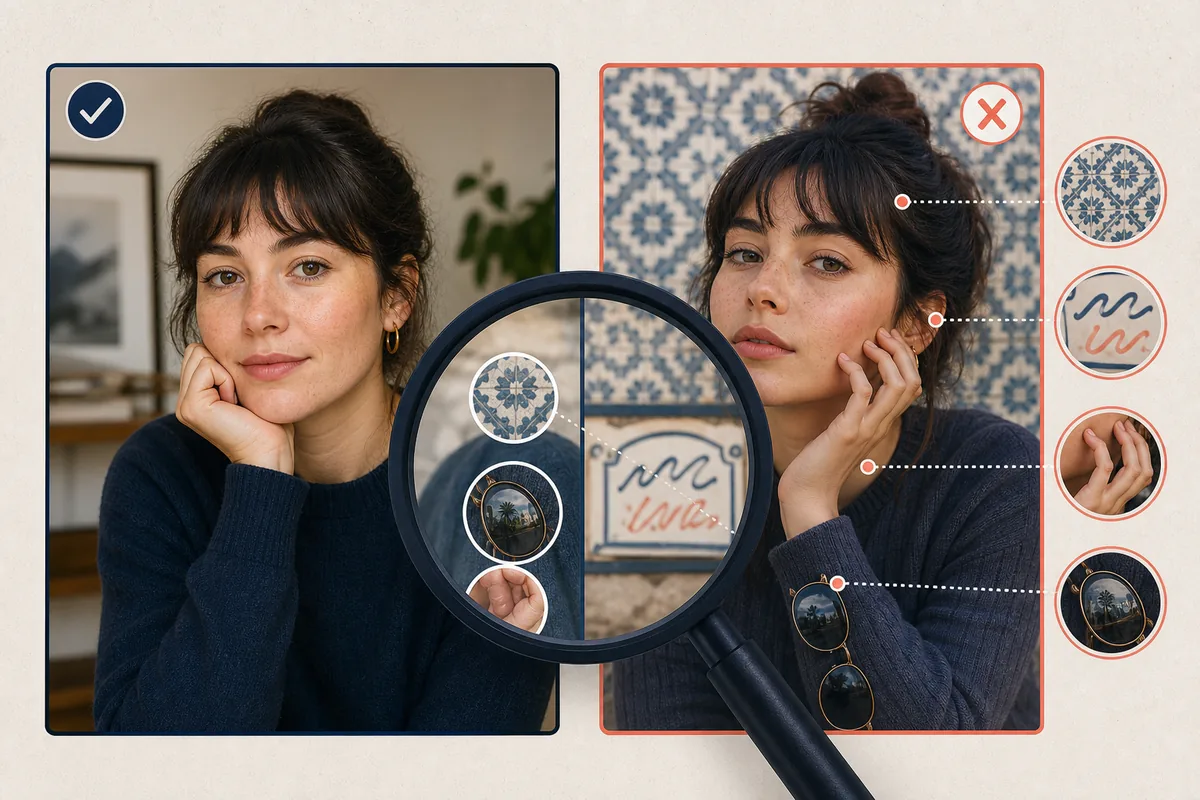
Table of Contents
When a photo looks unusually polished, impossible, or slightly wrong, it is natural to ask how to tell if an image is AI-generated. A useful review combines visual clues, provenance, publishing context, and AI image detector results; no single finger, eye, or checker score proves where an image came from.
Use the checks below as an evidence ladder. Start with what you can see, then inspect the file history and the post context. If you are checking an AI picture on Instagram, reading an important claim, or facing a safety or reputation risk, keep the conclusion cautious and look for an original source.
Quick answer: how to tell if an image is AI-generated
No single clue proves that a picture was made by AI. A more reliable review asks eight questions:
- Do hands, teeth, ears, jewelry, text, or reflections contain repeated or impossible details?
- Do lighting, shadows, perspective, and object edges agree with one another?
- Does the file retain useful metadata or Content Credentials about its creation and edits?
- Does the original post provide a credible creator, date, location, or source trail?
- Does Instagram display an AI or altered-content label, and what exactly does that label mean?
- Does reverse image search find an older source, a prompt showcase, or only reposts?
- Do multiple AI image checkers agree, or are they simply guessing from compression artifacts?
- What would count as independent confirmation before you share or act on it?
Best rule of thumb
Treat a result as “possibly AI-generated” until visual evidence and provenance point in the same direction. “No label” does not mean “real,” and “AI score” does not mean proof.
1. Look for visual inconsistencies—but check the whole image
Visual inspection is useful for forming a hypothesis. It becomes weak when one strange detail is isolated from the rest of the scene.
Text, logos, and repeated patterns
Zoom into signs, labels, book spines, tattoos, badges, and small UI elements. AI systems may produce near-words, inconsistent letter shapes, or repeated motifs. However, motion blur, low resolution, and an aggressive social-media resize can create similar artifacts.
Hands, faces, and small anatomy
Check fingers, fingernails, earrings, glasses, teeth, hair strands, and the borders of faces. A mismatch across neighboring details is more meaningful than a hand that is merely blurry. Retouched real portraits can also have smoothed skin or altered features.
Light, reflections, and geometry
Trace the direction of shadows and highlights. Look at mirrors, windows, water, metal, and eyeglasses. If a reflection shows a different pose or a shadow points in an impossible direction, the image deserves more checking—but perspective and compositing can also confuse the eye.
Edges and object relationships
Inspect hair against the background, fingers around objects, overlapping people, cables, straps, and the contact points where objects meet a surface. Synthetic images often struggle with relationships between objects, not just with individual objects.
Why visual clues are not enough
A real camera image can be edited, upscaled, filtered, or compressed. A generated image can be corrected by a person or exported cleanly. Visual inspection can raise or lower confidence, but it rarely establishes authorship.
2. Check provenance, metadata, and Content Credentials
The most useful question is often not “does this look like AI?” but “where did this file come from?” Find the earliest credible upload, the creator’s explanation, the date, and any original-resolution file. A reposted screenshot gives you much less evidence than a file shared directly by the photographer or publisher.
Metadata can include a camera model, editing software, creation time, or export history, but social platforms commonly remove or rewrite metadata. Content Credentials are a stronger provenance signal when they are present because they can record a signed history of creation and edits. Their absence is not evidence that an image is real, and their presence does not automatically make every claim in the image true.
- Download the highest-quality original that you are allowed to inspect; avoid treating a screenshot as the source file.
- Review EXIF and export information, while remembering that metadata can be removed or changed.
- Look for a Content Credentials or C2PA history and verify that the signer and edit chain are understandable.
- Compare the image with the creator’s other work, behind-the-scenes material, or an earlier version.
- Record the source URL and date you checked so another person can repeat the review.
How to Check an AI Picture on Instagram: Review Labels and Context
If you are checking an AI picture on Instagram, look at the exact label and the surrounding post context. Instagram may show an AI or altered-content label when its systems or a creator’s disclosure indicate that an image was generated or materially edited. It is useful platform context, not a universal detector verdict.
What a label can and cannot tell you
A label can show that Instagram has associated the post with AI or significant editing. It does not identify which pixels were generated, prove that the whole image is synthetic, verify the caption, or guarantee that an unlabelled post is a camera photograph.
Check the surrounding context
- Open the account history: a consistent creator profile is more informative than a single viral repost.
- Read the caption and comments for a generation disclosure, source credit, or correction.
- Check whether the image is a profile picture, advertisement, meme, screenshot, or news claim; each context has different stakes.
- Use the Instagram Profile Picture Tester for crop, clarity, lighting, and avatar readability—not for proving image origin.
- If a post could cause harm, avoid resharing it while the source is uncertain.
Do not confuse presentation with provenance
A profile picture can look clear and attractive while still being AI-generated, and a genuine photo can perform badly as a small avatar. Presentation quality and image origin are separate questions.
AI Image Detector and AI Image Checker Limits
An AI image detector or AI image checker estimates whether pixels resemble patterns found in generated-image training data. It may analyze frequency patterns, texture, noise, compression, image structure, or a model-specific watermark. Because tools use different datasets and thresholds, two checkers can disagree on the same file.
Detector results are especially fragile after screenshots, resizing, filters, multiple exports, or partial edits. They can also misclassify photographs, illustrations, and heavily retouched portraits. Use an AI image detector as one input in a review, not as a forensic certificate or a replacement for source verification.
What each check can tell you
| Check | Useful signal | Main limitation |
|---|---|---|
| Visual clues | Possible synthetic inconsistencies | Real edits and compression can look similar |
| Metadata | Camera or export history | Platforms and editors can remove or change it |
| Content Credentials | Signed creation/edit trail when present | Not every file has credentials; claims still need context |
| Instagram label | Platform disclosure or system association | No label is not proof of a camera original |
| Reverse search | Earlier source, repost, or related context | A new or private image may have no match |
| AI detector | A model-based probability estimate | Tools disagree and degrade after transformations |
5. Use this five-step verification workflow
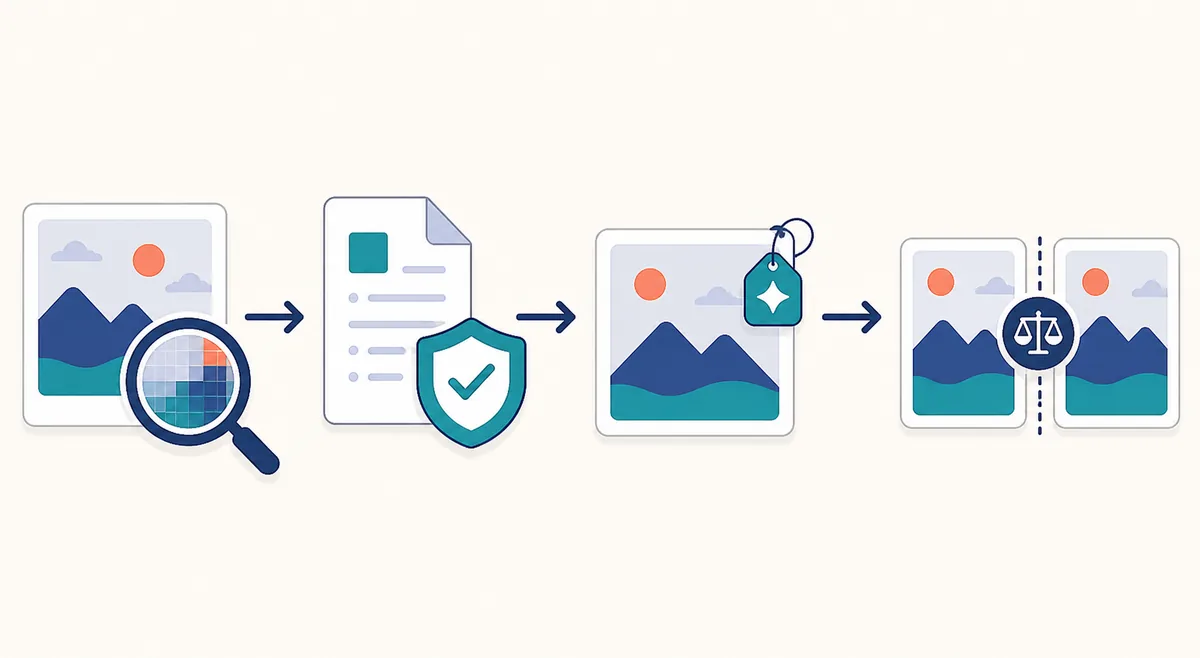
For a repeatable answer to “is this picture AI-generated?”, save your notes and move from the least invasive checks to the strongest available source evidence.
1. Save the original context
Record the post URL, account, caption, date, and any label. If possible, obtain the original file rather than a screenshot or a downloaded thumbnail.
2. Inspect at two sizes
View the full composition first, then zoom into text, anatomy, reflections, edges, and shadows. Write down several independent observations instead of one vague feeling.
3. Check provenance
Review metadata, Content Credentials, creator statements, earlier versions, and reverse image results. Separate what the file proves from what the caption merely claims.
4. Compare detector results cautiously
If the stakes justify it, submit the same unmodified file to more than one reputable checker. Record the tool name and result, but do not average scores into a false certainty.
5. State a bounded conclusion
Use language such as likely generated, possibly edited, no reliable evidence found, or unable to verify. Explain the strongest evidence and what remains unknown before sharing.
Common mistakes when checking an AI-generated image
The fastest way to get a wrong answer is to turn a useful clue into a rule.
- Assuming every malformed word proves AI; real photos can contain blur, reflections, or a later text overlay.
- Assuming perfect skin or dramatic lighting proves AI; professional photography and retouching can look synthetic.
- Uploading a screenshot to a detector and treating the score as if it described the original file.
- Reading “no AI label” as a guarantee that the post was made with a camera.
- Using a profile-photo or attractiveness tool to answer an image-origin question.
- Sharing a suspicious image before checking the earliest source and the consequences of being wrong.
The practical takeaway
To tell if an image is AI-generated, combine several modest signals: inspect the pixels, trace the source, check metadata or Content Credentials, read platform disclosures, and treat detector output as probabilistic. The more important the claim, the more you should prioritize an original file and an accountable source over visual intuition.
If your real question is whether a portrait will work as a social avatar, that is a different job. Image origin, attractiveness, crop, lighting, and readability can all be evaluated separately. Keep those questions separate so a polished image is not mistaken for a trustworthy one—or vice versa.
Frequently Asked Questions
Sources and further reading
- Meta: Labeling AI-generated images on Facebook, Instagram and Threads — Platform explanation of AI-related labels and disclosure context.
- C2PA: Content Credentials specification — Technical background on signed provenance and edit history.
Updated: August 13, 2026
Back to Rate My Photo